



Description
Download Quick Heal AntiVirus 2010 – antivirus, malware protection, DNAScan technology, web security, low resource usage
Overview
Quick Heal AntiVirus 2010 is a security-focused software designed to protect Windows systems from a broad spectrum of digital threats. Developed by Quick Heal Technologies, the application delivers foundational antivirus protection tailored for users seeking reliable defense against malware, including viruses, worms, trojans, and spyware. Its primary purpose is to ensure system integrity by continuously monitoring for malicious activity and neutralizing threats in real time. The software is especially suited for individuals and small businesses using older Windows systems who require stable, lightweight protection without performance degradation.
By leveraging DNAScan technology, Quick Heal AntiVirus 2010 offers proactive defense against emerging and unknown threats, a critical feature in an evolving cyber threat landscape. The application also includes web security functionality to block access to malicious websites, reducing exposure to phishing attempts and drive-by downloads. These capabilities make it a practical tool for users who prioritize system safety while maintaining optimal performance.
Although the developer did not provide additional technical details, the software’s 37.5 MB file size and release date of February 1, 2010, suggest it was built for legacy systems with limited resources. This makes it relevant for users still operating on older hardware or outdated Windows environments. Its continued availability as a free tool underscores its role as a lightweight, accessible security solution in the broader software ecosystem.
Key Features & Functionality
- Comprehensive Malware Protection: The software continuously scans files, emails, and system processes to detect and remove known and potentially harmful programs. This real-time monitoring helps prevent infections before they can spread across the system.
- DNAScan Technology: This proprietary method analyzes the behavior and structure of unknown files to identify threats that traditional signature-based detection might miss. It enhances protection against zero-day malware and polymorphic viruses.
- Web Security and Protection: Quick Heal AntiVirus 2010 blocks access to websites known to host malicious content, including phishing pages and malware distribution sites. This feature reduces the risk of accidental exposure during online browsing.
- Low Resource Usage: Designed with performance in mind, the application operates efficiently without consuming excessive CPU or memory. Users can expect minimal impact on system responsiveness during scans or background operations.
- Intuitive Interface: The software features a clean, organized layout that allows users to navigate settings, initiate scans, and review security status with ease. This accessibility makes it suitable for both novice and experienced users.
For example, a user working on a Windows XP machine with limited RAM can install this tool to maintain baseline protection without slowing down their workflow. Similarly, a home user browsing the internet daily benefits from real-time website blocking and automatic threat detection, ensuring safer online interactions.
Interface, UX & Performance
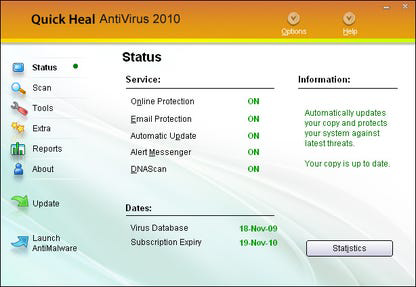
The user interface of Quick Heal AntiVirus 2010 is designed with simplicity and clarity in mind. Navigation is linear and consistent, with clearly labeled icons and menus that guide users through core functions such as scanning, updating definitions, and managing settings. The visual layout avoids clutter, prioritizing essential tools and minimizing distractions.
Navigation flow is straightforward, allowing users to initiate full system scans, quick checks, or custom scans with minimal steps. The status panel provides real-time updates on scan progress and detected threats, enhancing transparency and user confidence.
Although the developer did not list formal performance metrics, the application’s 37.5 MB size and focus on low resource usage suggest it was optimized for older hardware. It is expected to perform reliably on systems with limited processing power and memory, maintaining responsiveness during active use. Stability appears to be a design priority, as the software avoids frequent crashes or freezes during routine operations.
However, compatibility with modern systems is not guaranteed, and performance on newer Windows versions may vary. Users should assess their environment before installation, especially given the software’s release date in 2010.
Platform Compatibility & Technical Requirements
Quick Heal AntiVirus 2010 is designed for the Windows operating system. The software is compatible with 32-bit Windows platforms, as indicated by the product’s name and technical specifications. The file size is 37.5 MB, which reflects its lightweight footprint and minimal installation footprint.
The developer did not specify minimum OS requirements or hardware specifications beyond the 32-bit architecture. As such, compatibility with Windows 7, 8, or 10 is not confirmed. Users are advised to verify system compatibility before installation, particularly on modern systems where security protocols and system integrity checks may prevent older software from running.
Updates to the software are not available through standard channels, as the application was released in 2010 and has not been updated since. This limits its ability to defend against modern malware variants that emerged after its release.
Pros and Cons
Pros
- Lightweight design with low resource consumption
- Free to download and use
- Intuitive interface suitable for non-technical users
- Includes DNAScan technology for advanced threat detection
- Offers web security features to block malicious sites
Cons
- Released in 2010; lacks support for modern malware threats
- No recent updates or security patches
- Compatibility with current Windows versions not confirmed
- Not suitable for systems requiring real-time threat intelligence
- May trigger warnings on modern antivirus or firewall software
FAQ
Is Quick Heal AntiVirus 2010 safe to install on my computer?
While the software was released in 2010 and is no longer actively maintained, it can be installed on older systems for basic protection. However, users should exercise caution on modern systems, as outdated software may pose risks due to unpatched vulnerabilities.
Can I update Quick Heal AntiVirus 2010?
The developer has not released any updates since the initial 2010 release. As such, the software does not receive virus definition updates or security patches, limiting its effectiveness against newer threats.
Is Quick Heal AntiVirus 2010 compatible with Windows 10 or 11?
Compatibility with Windows 10 or 11 is not confirmed. The software was designed for 32-bit Windows systems and may not run properly on newer operating systems due to changes in system architecture and security policies.
Does Quick Heal AntiVirus 2010 protect against ransomware?
While it offers protection against known malware types, including trojans and spyware, its outdated detection engine may not effectively identify modern ransomware variants that emerged after 2010.
Can I use Quick Heal AntiVirus 2010 alongside other antivirus software?
Running multiple antivirus programs simultaneously is generally not recommended, as it can lead to conflicts, performance issues, and false positives. It is best to use one antivirus at a time.
Final Thoughts
Quick Heal AntiVirus 2010 remains a historically significant tool in the evolution of consumer antivirus software. Its emphasis on low resource usage, intuitive design, and early adoption of behavioral analysis through DNAScan technology set a benchmark for lightweight security solutions. However, its age and lack of updates make it unsuitable for modern computing environments.
For users with legacy systems running older versions of Windows, it may still serve as a functional, free option for basic protection. Yet, for the majority of users today, it cannot match the capabilities of current antivirus tools that offer real-time threat intelligence, cloud-based detection, and automatic updates.
While it represents a step forward in its time, relying on it today poses significant security risks. The best approach is to use modern, actively maintained security software that adapts to evolving threats.
Download Quick Heal AntiVirus 2010 now
Guides & Tutorials for Quick Heal AntiVirus 2010 32-bit
How to install Quick Heal AntiVirus 2010 32-bit
- Click the Preview / Download button above.
- Once redirected, accept the terms and click Install.
- Wait for the Quick Heal AntiVirus 2010 32-bit download to finish on your device.
How to use Quick Heal AntiVirus 2010 32-bit
This software is primarily used for its core features described above. Open the app after installation to explore its capabilities.
User Reviews for Quick Heal AntiVirus 2010 32-bit 0
No reviews found


